Configure SSH access to connect directly to a running deployment container
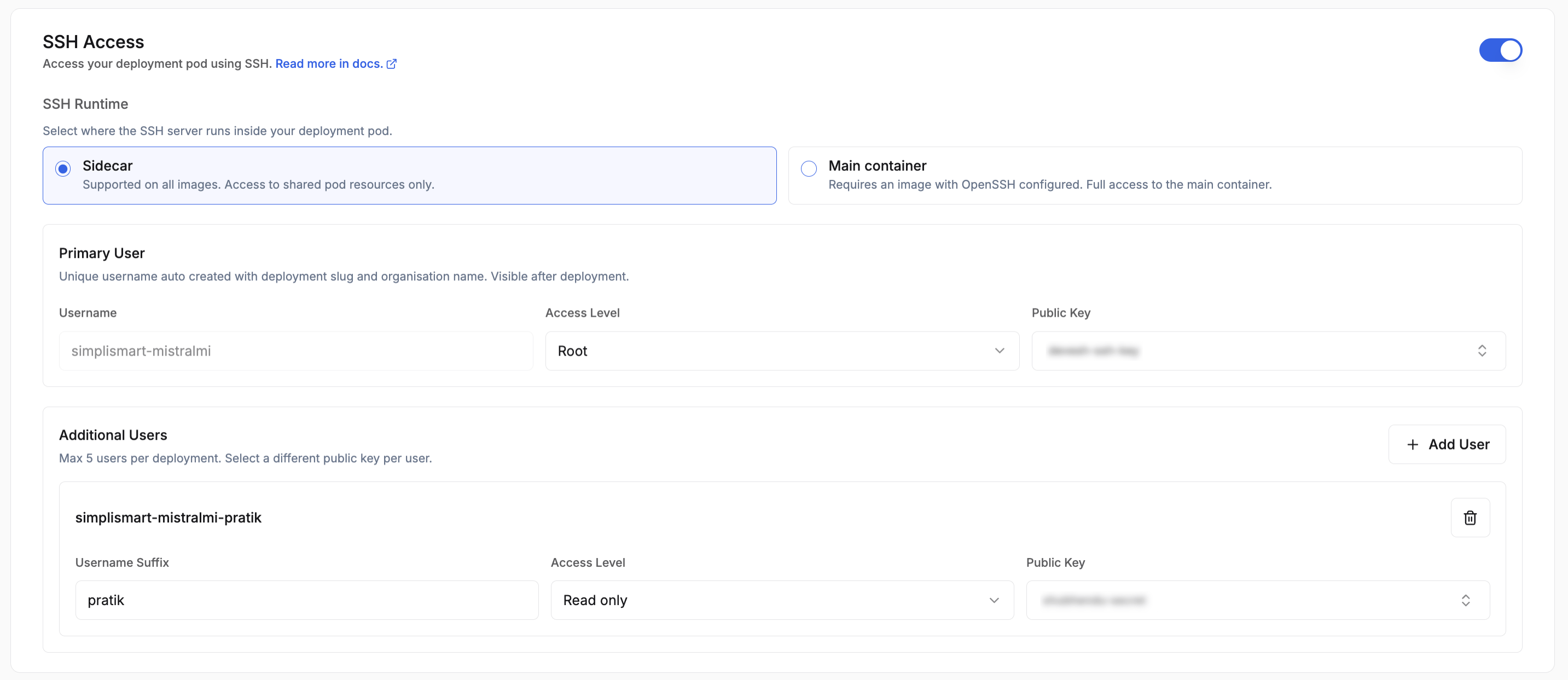
SSH access lets you connect directly to a running container in your deployment, which is useful for debugging, inspecting logs, or running ad-hoc commands without rebuilding and redeploying.Toggle SSH Access on during deployment creation to configure it. Up to 5 users per deployment are supported.
The SSH Runtime dropdown controls how SSH is served:
Sidecar: Simplismart injects a sidecar container that handles SSH. Use this if your image does not already include an SSH server. No changes to your Dockerfile are required.
Main Container: SSH runs inside your primary container. Use this when you are bringing your own image that already has openssh-server installed and configured.
Primary User is created automatically. The username is derived from your deployment slug (e.g. <YOUR-ORG-NAME>-<DEPLOYMENT-SLUG>) and gets Root access by default.Additional Users follow the format <YOUR-ORG-NAME>-<DEPLOYMENT-SLUG>-<SUFFIX> and are granted Limited access. You can add up to 4 additional users alongside the primary user.Each user is associated with an SSH Secret, a Kubernetes secret holding the authorized public key for that user.
If you select Main Container as the runtime, your image must have openssh-server installed and sshd configured to start on launch. Below is a reference Dockerfile:
FROM nvidia/cuda:13.0.0-runtime-ubuntu24.04RUN apt-get update && \ apt-get install -y --no-install-recommends \ bash \ openssh-server \ openssh-client \ libnss-wrapper && \ rm -rf /var/lib/apt/lists/*COPY entrypoint.sh /usr/local/bin/entrypoint.shRUN chmod +x /usr/local/bin/entrypoint.shRUN set -eux; \ if ! getent group 1000 >/dev/null; then groupadd -g 1000 appuser; fi; \ if ! id -u 1000 >/dev/null 2>&1; then useradd -u 1000 -g 1000 -s /bin/bash -M appuser; fiEXPOSE 2222USER 1000:1000ENTRYPOINT ["/usr/local/bin/entrypoint.sh"]
Using CUDA 12.x (for CUDA < 13.0.0)
If your environment requires CUDA 12.x, replace the base image in the Dockerfile above with:
FROM nvidia/cuda:12.9.1-runtime-ubuntu24.04
The rest of the Dockerfile remains unchanged.
Entrypoint Script Example
Create an entrypoint.sh file in the same directory as your Dockerfile. This script initializes the SSH environment and starts the SSH daemon:
entrypoint.sh
#!/bin/bashset -euo pipefail# When not the designated ssh sidecar, skip sshd and idle as the main container.if [ "${SSH_CONTAINER_ROLE:-}" != "sidecar" ]; then exec /bin/sleep infinityfiRUNTIME="${SSH_RUNTIME_DIR:-/ssh-runtime}"SSH_UID="${PUID:-1000}"SSH_GID="${PGID:-1000}"if [ ! -d "${RUNTIME}" ]; then echo "ERROR: SSH runtime dir ${RUNTIME} is missing; ensure the ssh-runtime volume is mounted here" >&2 exit 1fi# SSH_USERNAMES: comma-separated list of all usernames that SSHPiper may forward.# Each gets a passwd entry so sshd can resolve them (all map to uid/gid 1000).IFS=',' read -ra USERS <<< "${SSH_USERNAMES:-${SSH_USERNAME:-deployment-user}}": > "${RUNTIME}/nss-passwd": > "${RUNTIME}/nss-group"for USER in "${USERS[@]}"; do USER="${USER// /}" # trim spaces [ -n "${USER}" ] || continue echo "${USER}:x:${SSH_UID}:${SSH_GID}:SSH User:${RUNTIME}/home:/bin/bash" >> "${RUNTIME}/nss-passwd"doneecho "${USERS[0]}:x:${SSH_GID}:" >> "${RUNTIME}/nss-group"NSS_WRAPPER_LIB=$(find /usr/lib -name "libnss_wrapper.so*" -type f 2>/dev/null | head -1)if [ -z "${NSS_WRAPPER_LIB}" ]; then echo "ERROR: libnss_wrapper.so not found — cannot resolve SSH username" >&2 exit 1fiexport NSS_WRAPPER_PASSWD="${RUNTIME}/nss-passwd"export NSS_WRAPPER_GROUP="${RUNTIME}/nss-group"export LD_PRELOAD="${NSS_WRAPPER_LIB}"if [ ! -f "${RUNTIME}/sshd_config" ]; then if [ -x /ssh-init/05-ssh-init.sh ]; then /bin/bash /ssh-init/05-ssh-init.sh else # main_container mode: no init container pre-runs; self-initialise. ssh-keygen -t ed25519 -f "${RUNTIME}/ssh_host_ed25519_key" -N "" -q ssh-keygen -t rsa -b 4096 -f "${RUNTIME}/ssh_host_rsa_key" -N "" -q chmod 600 "${RUNTIME}/ssh_host_"* AUTH_KEYS="${SSH_AUTHORIZED_KEYS_FILE:-${RUNTIME}/home/.ssh/authorized_keys}" mkdir -p "$(dirname "${AUTH_KEYS}")" [ -f "${AUTH_KEYS}" ] || touch "${AUTH_KEYS}" chmod 600 "${AUTH_KEYS}" if [ "${SSH_AUDIT_LOGGING:-true}" = "true" ]; then cat > "${RUNTIME}/ssh-audit-shell" << 'AUDIT_EOF'#!/bin/bashSESSION_ID=$(tr -dc 'a-f0-9' < /dev/urandom 2>/dev/null | head -c8 || printf '%x' "$(date +%s)")SRC_IP="${SSH_CLIENT%% *}"TS="$(date -u +%Y-%m-%dT%H:%M:%SZ)"printf '%s SSH_AUDIT connect user=%s src=%s session=%s\n' "$TS" "$USER" "$SRC_IP" "$SESSION_ID" >&2if [ -n "${SSH_ORIGINAL_COMMAND:-}" ]; then printf '%s SSH_AUDIT exec user=%s src=%s session=%s cmd=%s\n' "$TS" "$USER" "$SRC_IP" "$SESSION_ID" "$(printf '%q' "$SSH_ORIGINAL_COMMAND")" >&2 exec /bin/bash -c "$SSH_ORIGINAL_COMMAND"else exec /bin/bash -lfiAUDIT_EOF chmod +x "${RUNTIME}/ssh-audit-shell" fi SSH_PORT_VAL="${SSH_PORT:-2222}" cat > "${RUNTIME}/sshd_config" << EOFPort ${SSH_PORT_VAL}HostKey ${RUNTIME}/ssh_host_ed25519_keyHostKey ${RUNTIME}/ssh_host_rsa_keyPidFile ${RUNTIME}/sshd.pidAuthorizedKeysFile ${AUTH_KEYS}UsePAM noPasswordAuthentication noChallengeResponseAuthentication noKbdInteractiveAuthentication noPermitRootLogin noAllowTcpForwarding noAllowAgentForwarding noGatewayPorts noX11Forwarding noMaxAuthTries 3MaxSessions 2LoginGraceTime 30ClientAliveInterval 120ClientAliveCountMax 2PermitEmptyPasswords noPermitUserEnvironment noPermitUserRC noPermitTunnel noPrintLastLog yesEOF if [ "${SSH_AUDIT_LOGGING:-true}" = "true" ]; then echo "ForceCommand ${RUNTIME}/ssh-audit-shell" >> "${RUNTIME}/sshd_config" fi fifiexec /usr/sbin/sshd -D -e -f "${RUNTIME}/sshd_config"
Key requirements:
openssh-server must be installed, SSH will not work without it.
Password authentication is disabled; only public key auth is accepted.
Port 2222 must be exposed.
ssh-keygen -A generates the host keys at build time.
The CMD optionally runs a bootstrap script (passed via $SSH_BOOTSTRAP_SCRIPT) before starting sshd in the foreground.
The SSH Secret you configure in the Secrets tab must contain the public key that corresponds to the private key you will use when connecting.
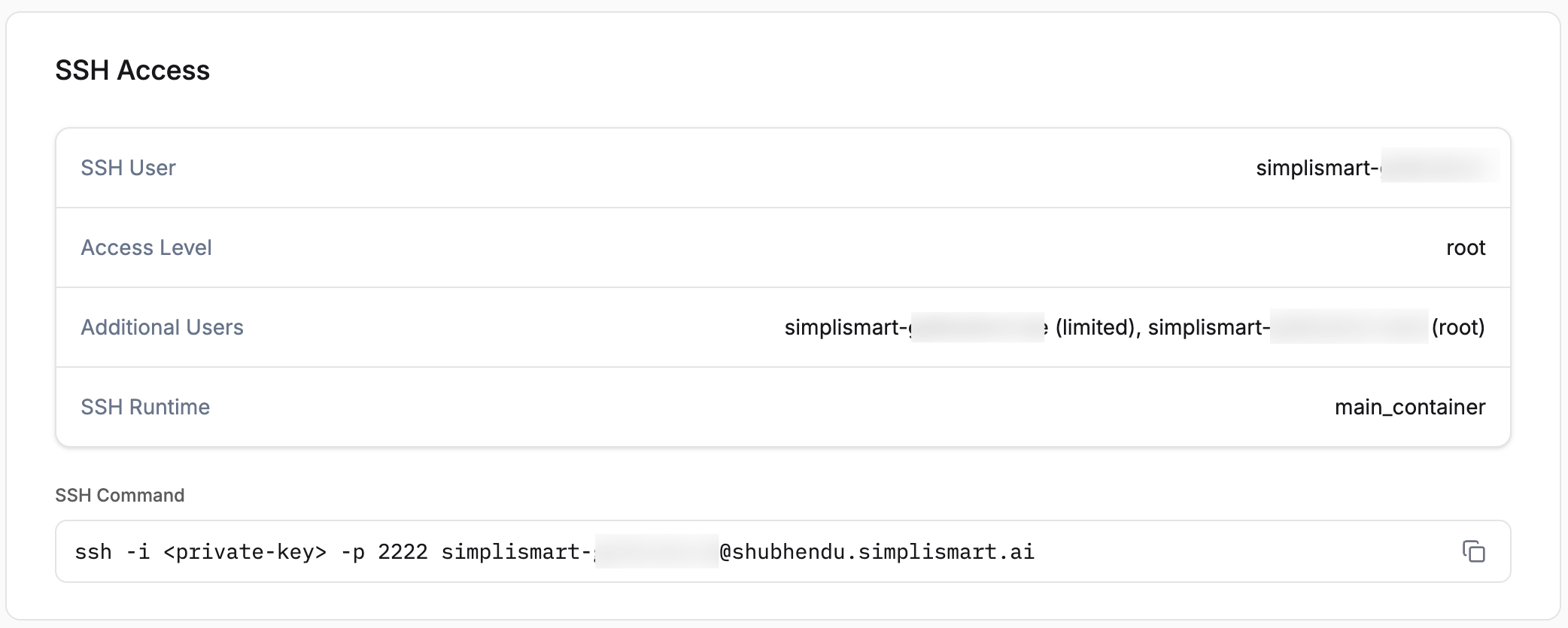
Once the deployment status shows deployed, open the deployment detail page. The SSH Access section shows the ready-to-use command pre-filled with your username and host:Copy the command and point -i to your .pem private key file: