> ## Documentation Index
> Fetch the complete documentation index at: https://docs.simplismart.ai/llms.txt
> Use this file to discover all available pages before exploring further.
# Initiate a New Training Job
> Steps to fine-tune a flux model using the Simplismart platform
* Navigate to the **My Trainings** section in the platform.
* Click on **Add a Training Job** to create a new job.
## **Basic Details and Dataset Upload**
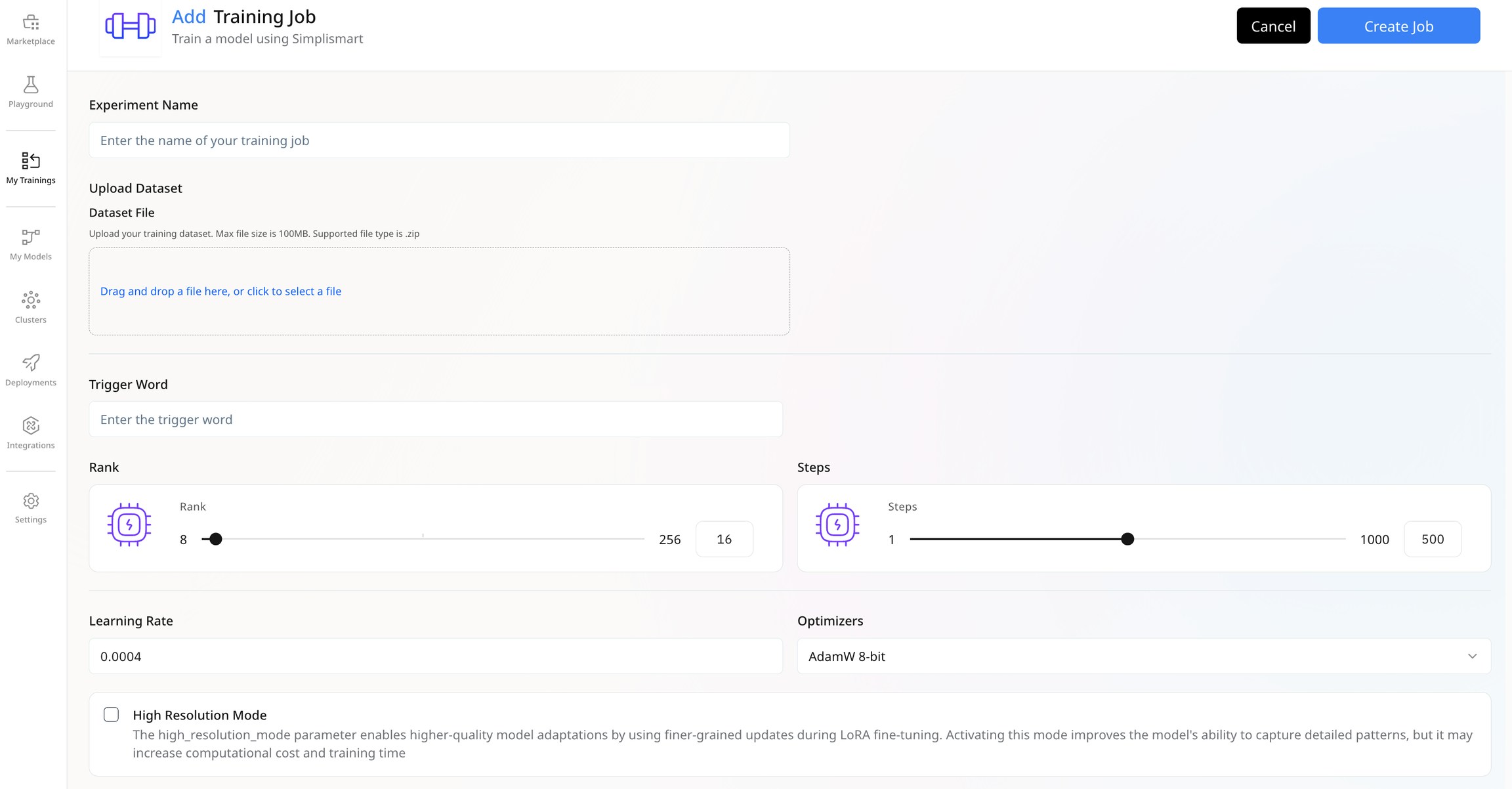
* Provide a name for your experiment.
* Upload your training dataset.
1. **Prepare the Training Dataset**
* Compile all the images to be used for training into a single folder.
2. **Text Files for Images (optional)**
* Each image in the training dataset can have an accompanying `.txt` file with the same name.
* The `.txt` file should contain a description detailing what is required in the corresponding image. *This step will significantly enhance the effectiveness of the training process*
3. **Packaging Files in a ZIP**
* All images and their respective `.txt` files must be included in a single ZIP file.
* Ensuring both image and text files are packaged together improves the quality of the training process.
4. **Trigger Word Assignment**
* Assign one unique trigger word per training job.
* This trigger word will be used to reference the LoRA generated by the training job.
Upload the **training dataset** as a file containing the required images for model training. This ensures that all files are placed at the root of the zip archive, with **no subdirectories considered**.
 ***
## **Select Training Parameters**
Update the training parameters based on your requirements for the training job.
Here is a short explanation of these parameters:
* Specifies a keyword or phrase that activates a specific behaviour in the model during inference. It enables the model to adjust its responses based on the context or task without requiring further training.
* Controls the dimensionality of the LoRA matrices; a higher rank improves adaptation but increases computational cost.
* Defines the number of fine-tuning iterations; more steps improve model performance but increase training time.
* Controls the size of weight updates during fine-tuning. A higher value accelerates training but may risk overshooting, while a lower value offers more precise updates at the cost of longer training time.
* Controls how the model’s parameters are updated during training to minimize loss.
* **AdamW 8-bit:** A variant of the Adam optimizer that leverages 8-bit precision to optimize memory usage and increase computational speed. This approach is ideal for large-scale models enabling quicker convergence while preserving model stability and high performance.
* **Prodigy**:A custom-built optimizer engineered to boost training speed and model efficiency. It accelerates the convergence process and ensures optimal performance, making it suitable for both fine-tuning and large-scale model training.
***
## **Start and Monitor the Training Job**
Once the configuration is updated, start the training job and monitor its progress in the **Recent Jobs** section of the UI. Keep track of metrics, logs, and any intermediate results to ensure the training meets your requirements.
***
***
## **Select Training Parameters**
Update the training parameters based on your requirements for the training job.
Here is a short explanation of these parameters:
* Specifies a keyword or phrase that activates a specific behaviour in the model during inference. It enables the model to adjust its responses based on the context or task without requiring further training.
* Controls the dimensionality of the LoRA matrices; a higher rank improves adaptation but increases computational cost.
* Defines the number of fine-tuning iterations; more steps improve model performance but increase training time.
* Controls the size of weight updates during fine-tuning. A higher value accelerates training but may risk overshooting, while a lower value offers more precise updates at the cost of longer training time.
* Controls how the model’s parameters are updated during training to minimize loss.
* **AdamW 8-bit:** A variant of the Adam optimizer that leverages 8-bit precision to optimize memory usage and increase computational speed. This approach is ideal for large-scale models enabling quicker convergence while preserving model stability and high performance.
* **Prodigy**:A custom-built optimizer engineered to boost training speed and model efficiency. It accelerates the convergence process and ensures optimal performance, making it suitable for both fine-tuning and large-scale model training.
***
## **Start and Monitor the Training Job**
Once the configuration is updated, start the training job and monitor its progress in the **Recent Jobs** section of the UI. Keep track of metrics, logs, and any intermediate results to ensure the training meets your requirements.
***