> ## Documentation Index
> Fetch the complete documentation index at: https://docs.simplismart.ai/llms.txt
> Use this file to discover all available pages before exploring further.
# API Keys
> Generate and manage API keys to authenticate requests to your Simplismart.ai organisation
API keys authenticate requests to the Simplismart.ai platform, giving you programmatic access to deploy, call, and manage models within your organisation.
 ## Generating an API Key
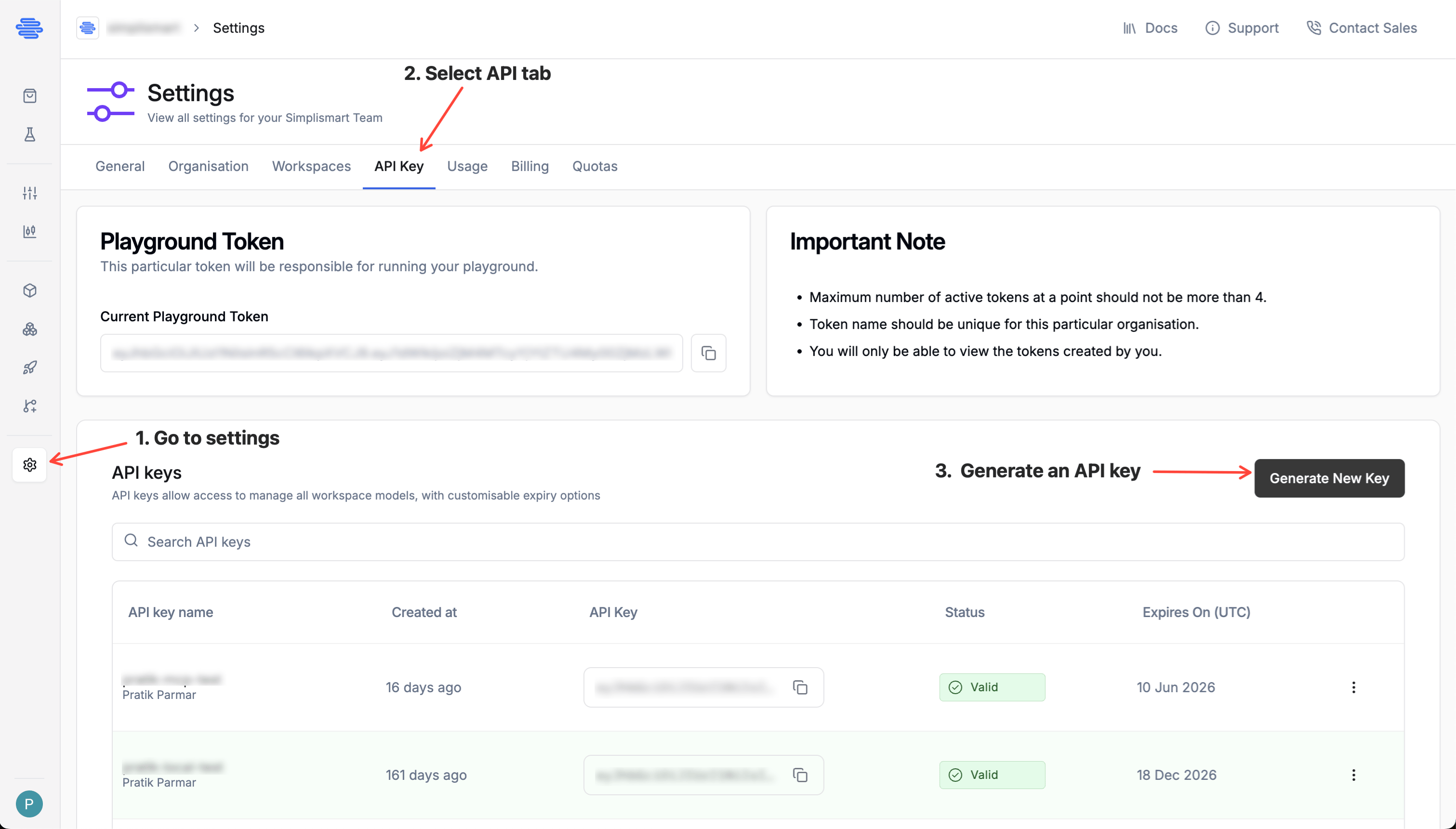
1. Navigate to **Settings -> API Keys** in your organisation dashboard.
2. Click **Generate Key**. The **Add API Key** popup appears.
3. Enter a **Key Name** (e.g., `prod-inference`, `ci-pipeline`).
4. Select an **Expiration** from the dropdown (e.g., `1 week`). The **Expires on** date is calculated automatically.
5. Click **Generate New Key**.
6. Copy the key.
## Generating an API Key
1. Navigate to **Settings -> API Keys** in your organisation dashboard.
2. Click **Generate Key**. The **Add API Key** popup appears.
3. Enter a **Key Name** (e.g., `prod-inference`, `ci-pipeline`).
4. Select an **Expiration** from the dropdown (e.g., `1 week`). The **Expires on** date is calculated automatically.
5. Click **Generate New Key**.
6. Copy the key.
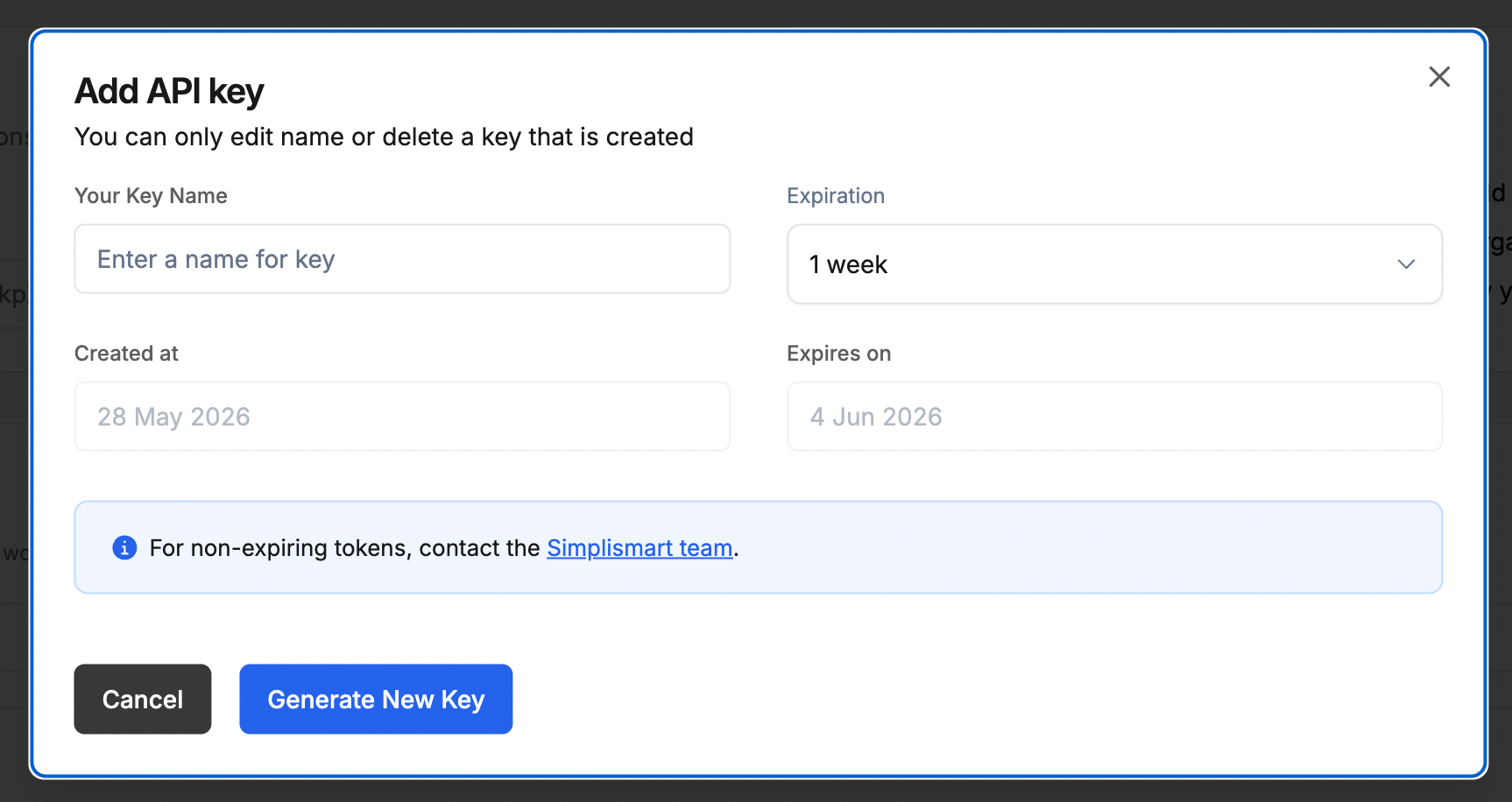 Once generated, the key appears in the API Keys table.
For non-expiring tokens, contact the [Simplismart team](mailto:support@simplismart.ai).
## Key Expiry
Each key displays its expiry date in the API Keys table. Keys expire at midnight UTC on the configured date and will return `401 Unauthorized` after that point. Rotate keys before expiry to avoid service interruption.
| Field | Description |
| ---------------- | ------------------------------------------------------------ |
| Name | Label you assigned at creation |
| Created at | Date the key was generated |
| Expires on (UTC) | Date the key becomes invalid (`Never` for non-expiring keys) |
| Status | `Active` or `Expired` |
## Using Your API Key
Pass the API key as a Bearer token in the `Authorization` header on every request:
```bash theme={null}
curl 'https://api.simplismart.live/chat/completions' \
-H 'Content-Type: application/json' \
-H 'Authorization: Bearer ' \
-d '{
"model": "meta-llama/Meta-Llama-3.1-8B-Instruct",
"messages": [
{
"role": "user",
"content": "write a sentence on usa"
}
]
}'
```
For SDK usage, set it via the environment variable your client expects:
```bash theme={null}
export SIMPLISMART_API_KEY=""
```
## Deleting an API Key
Click the **Delete** action next to any key in the table to invalidate it immediately. Deleting a key is permanent and any service using it will need to be updated with a new key.
## Best Practices
* **One key per environment**: Use separate keys for `dev`, `staging`, and `production` so you can rotate one without affecting others.
* **Never commit keys to source control**: Use environment variables or a secrets manager.
* **Set expiry dates**: Short-lived keys reduce the impact even if a key is leaked.
* **Rotate regularly**: Generate a replacement before deleting the old key to avoid downtime.
Once generated, the key appears in the API Keys table.
For non-expiring tokens, contact the [Simplismart team](mailto:support@simplismart.ai).
## Key Expiry
Each key displays its expiry date in the API Keys table. Keys expire at midnight UTC on the configured date and will return `401 Unauthorized` after that point. Rotate keys before expiry to avoid service interruption.
| Field | Description |
| ---------------- | ------------------------------------------------------------ |
| Name | Label you assigned at creation |
| Created at | Date the key was generated |
| Expires on (UTC) | Date the key becomes invalid (`Never` for non-expiring keys) |
| Status | `Active` or `Expired` |
## Using Your API Key
Pass the API key as a Bearer token in the `Authorization` header on every request:
```bash theme={null}
curl 'https://api.simplismart.live/chat/completions' \
-H 'Content-Type: application/json' \
-H 'Authorization: Bearer ' \
-d '{
"model": "meta-llama/Meta-Llama-3.1-8B-Instruct",
"messages": [
{
"role": "user",
"content": "write a sentence on usa"
}
]
}'
```
For SDK usage, set it via the environment variable your client expects:
```bash theme={null}
export SIMPLISMART_API_KEY=""
```
## Deleting an API Key
Click the **Delete** action next to any key in the table to invalidate it immediately. Deleting a key is permanent and any service using it will need to be updated with a new key.
## Best Practices
* **One key per environment**: Use separate keys for `dev`, `staging`, and `production` so you can rotate one without affecting others.
* **Never commit keys to source control**: Use environment variables or a secrets manager.
* **Set expiry dates**: Short-lived keys reduce the impact even if a key is leaked.
* **Rotate regularly**: Generate a replacement before deleting the old key to avoid downtime.