> ## Documentation Index
> Fetch the complete documentation index at: https://docs.simplismart.ai/llms.txt
> Use this file to discover all available pages before exploring further.
# Overview
> Deploy and run models on your own cloud infrastructure.
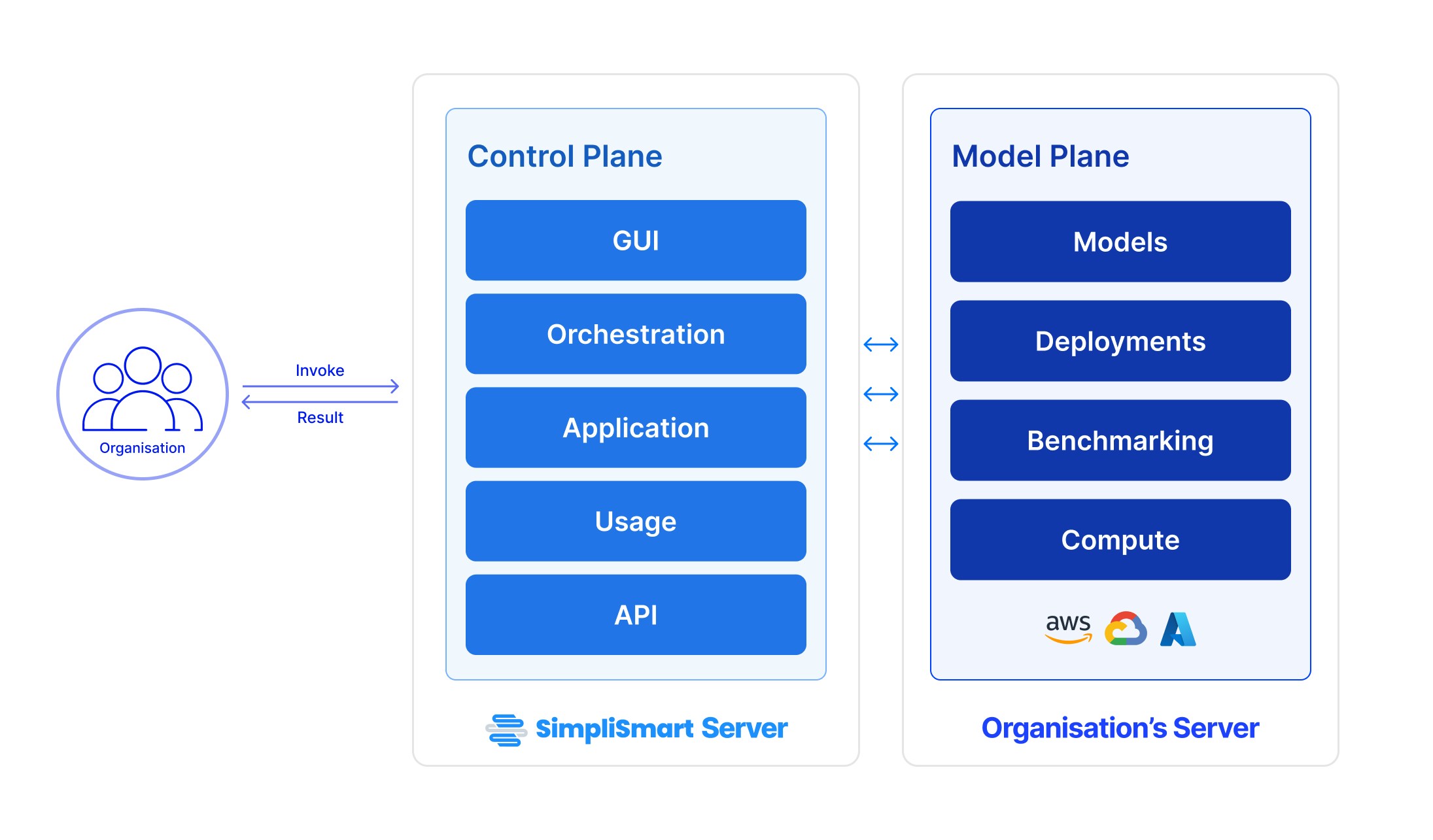
Bring-your-own-compute (BYOC) allows you to use your own compute solution for deploying and running your ML models.
 ***
## **Benefits of BYOC**
* **Control over infrastructure**: Utilize your existing resources and configurations.
* **Cost savings**: Avoid additional costs associated with using our infrastructure.
* **Scalability**: Scale deployments according to your own infrastructure capabilities.
***
## **Deploying a model using your own compute**
To deploy your model using your own compute resources, complete the necessary prerequisite integrations and set up your workflow seamlessly on the model suite using the processes outlined below:
1. **Integrating your accounts** You can add your cloud accounts, hosted zones and create secrets for your secure information, within the [integrations](/model-suite/integrations/secrets) page.
2. **Adding your cluster** Add your compute cluster by navigating to the [Clusters](/model-suite/clusters) page and providing the necessary details.
3. **Model Optimisation**
* To optimise a model, you can either choose an available model from our [model marketplace](https://app.simplismart.ai/model-marketplace), or add your own.
* Optimise your model for deployment by visiting the [Models](/model-suite/optimise-a-model) page and using our optimisation tools.
4. **Model Deployment** Deploy your optimised model through the steps mentioned in the [Deployments](/model-suite/deployments/creating-a-deployment) page.
5. **Monitoring your deployment** Keep track of your deployment using the [monitoring tools](/model-suite/deployments/inference-and-monitoring) available on the deployments page.
6. **Running a benchmarking job** Additionally, you can perform [benchmark](/model-suite/deployments/benchmarking) your deployed model for specific scenarios.
7. **Inferencing** You can invoke your deployed models from the **API tab** of the model deployment.
For **BYOC (Bring Your Own Cloud)** deployments, pricing may vary based on your setup and resource usage. Please contact our [support team](https://support.simplismart.ai/support/tickets/new?ticket_form=ask_a_question) for pricing information.
***
## **Benefits of BYOC**
* **Control over infrastructure**: Utilize your existing resources and configurations.
* **Cost savings**: Avoid additional costs associated with using our infrastructure.
* **Scalability**: Scale deployments according to your own infrastructure capabilities.
***
## **Deploying a model using your own compute**
To deploy your model using your own compute resources, complete the necessary prerequisite integrations and set up your workflow seamlessly on the model suite using the processes outlined below:
1. **Integrating your accounts** You can add your cloud accounts, hosted zones and create secrets for your secure information, within the [integrations](/model-suite/integrations/secrets) page.
2. **Adding your cluster** Add your compute cluster by navigating to the [Clusters](/model-suite/clusters) page and providing the necessary details.
3. **Model Optimisation**
* To optimise a model, you can either choose an available model from our [model marketplace](https://app.simplismart.ai/model-marketplace), or add your own.
* Optimise your model for deployment by visiting the [Models](/model-suite/optimise-a-model) page and using our optimisation tools.
4. **Model Deployment** Deploy your optimised model through the steps mentioned in the [Deployments](/model-suite/deployments/creating-a-deployment) page.
5. **Monitoring your deployment** Keep track of your deployment using the [monitoring tools](/model-suite/deployments/inference-and-monitoring) available on the deployments page.
6. **Running a benchmarking job** Additionally, you can perform [benchmark](/model-suite/deployments/benchmarking) your deployed model for specific scenarios.
7. **Inferencing** You can invoke your deployed models from the **API tab** of the model deployment.
For **BYOC (Bring Your Own Cloud)** deployments, pricing may vary based on your setup and resource usage. Please contact our [support team](https://support.simplismart.ai/support/tickets/new?ticket_form=ask_a_question) for pricing information.