> ## Documentation Index
> Fetch the complete documentation index at: https://docs.simplismart.ai/llms.txt
> Use this file to discover all available pages before exploring further.
# LiveKit Integration with Simplismart
> Learn how to build real-time voice AI agents using LiveKit with Simplismart's high-performance inference APIs
## What is LiveKit?
LiveKit is an open-source platform that enables scalable, multi-user conferencing with WebRTC. It provides the tools you need to add real-time video, audio, and data capabilities to your applications. By combining LiveKit with Simplismart's optimized inference, you can build responsive voice AI agents that handle conversations with minimal latency. Learn more at [LiveKit.io](https://livekit.io).
## Prerequisites
Before you begin, ensure you have:
* **Simplismart API Key** - Get your API key from [Settings > API Keys](/model-suite/settings/api-keys)
* **LiveKit Account** - Visit [LiveKit Cloud](https://cloud.livekit.io/) and create an account to get your API credentials
* **Python 3.11 - 3.13** - LiveKit agents require Python \< 3.14. Verify your version with `python --version`
Simplismart provides comprehensive AI model serving including STT (Speech-to-Text), LLM (Language Models), and TTS (Text-to-Speech) - all optimized for ultra-low latency in real-time applications.
## Configure LiveKit with Simplismart
Set up an isolated Python environment for your project. This keeps dependencies organized and prevents conflicts with other projects.
```bash theme={null}
python -m venv .venv
source .venv/bin/activate # On Windows: .venv\Scripts\activate
```
Install the LiveKit agents framework with the Simplismart plugin. This includes voice activity detection (VAD) and all necessary components.
```bash theme={null}
pip install livekit-plugins-simplismart 'livekit-agents[silero]' python-dotenv
```
The `simplismart` plugin provides native support for Simplismart's STT and TTS services, while the `openai` plugin (included by default) allows you to use any OpenAI-compatible LLM API.
Create a `.env` file in your project directory with your API credentials. These credentials authenticate your application with Simplismart and LiveKit services.
```bash theme={null}
SIMPLISMART_API_KEY=your-simplismart-api-key-here
LIVEKIT_URL=your-livekit-url-here
LIVEKIT_API_KEY=your-livekit-api-key-here
LIVEKIT_API_SECRET=your-livekit-api-secret-here
```
Get your LiveKit credentials from the [LiveKit Cloud dashboard](https://cloud.livekit.io/):
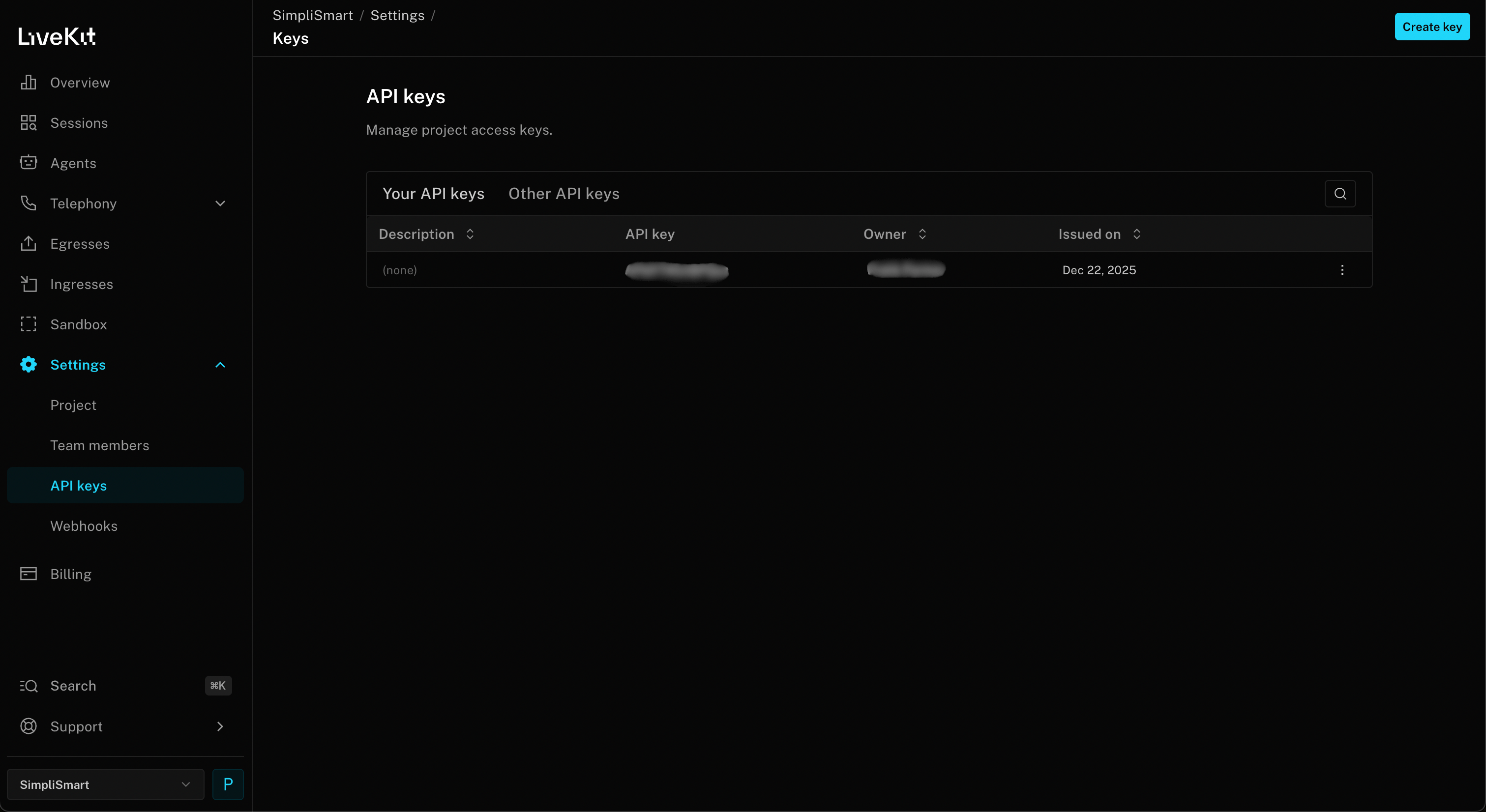 Fetch following credentials these in Settings → API Keys → Create key → Copy `Environment Variables` and paste it in the `.env` file.
* **LIVEKIT\_URL**: Your project URL (starts with `wss://`)
* **LIVEKIT\_API\_KEY**
* **LIVEKIT\_API\_SECRET**
Build a complete voice AI agent that uses Simplismart for speech-to-text, language processing, and text-to-speech.
Create a file named `voice_agent.py`:
```python theme={null}
import logging
import os
from dotenv import load_dotenv
from livekit import agents, api
from livekit.agents import AgentSession, Agent
from livekit.plugins import openai, silero, simplismart
load_dotenv()
logging.basicConfig(level=logging.INFO)
logger = logging.getLogger("voice-agent")
# Load Simplismart credentials
SIMPLISMART_API_KEY = os.getenv("SIMPLISMART_API_KEY")
SIMPLISMART_BASE_URL = "https://api.simplismart.live"
# Load LiveKit credentials
LIVEKIT_API_KEY = os.getenv("LIVEKIT_API_KEY")
LIVEKIT_API_SECRET = os.getenv("LIVEKIT_API_SECRET")
LIVEKIT_URL = os.getenv("LIVEKIT_URL")
class Assistant(Agent):
def __init__(self) -> None:
super().__init__(instructions="You are a helpful voice AI assistant.")
# Initialize Simplismart STT (Speech-to-Text) model
stt = simplismart.STT(
base_url=f"{SIMPLISMART_BASE_URL}/predict",
api_key=SIMPLISMART_API_KEY,
model="openai/whisper-large-v3-turbo"
)
# Initialize Simplismart LLM
llm = openai.LLM(
model="google/gemma-3-4b-it",
api_key=SIMPLISMART_API_KEY,
base_url=SIMPLISMART_BASE_URL,
)
# Initialize Simplismart TTS (Text-to-Speech) model
tts = simplismart.TTS(
base_url=f"{SIMPLISMART_BASE_URL}/tts",
api_key=SIMPLISMART_API_KEY,
model="canopylabs/orpheus-3b-0.1-ft"
)
async def entrypoint(ctx: agents.JobContext):
logger.info(f"Starting agent in room {ctx.room.name}")
session = AgentSession(
stt=stt,
llm=llm,
tts=tts,
vad=silero.VAD.load(),
)
await session.start(
room=ctx.room,
agent=Assistant(),
)
await session.generate_reply(
instructions="Greet the user and offer your assistance."
)
if __name__ == "__main__":
# Generate and display token
if not LIVEKIT_API_KEY or not LIVEKIT_API_SECRET:
print("Missing LIVEKIT_API_KEY or LIVEKIT_API_SECRET in .env file")
print("Get these from your LiveKit Cloud dashboard: https://cloud.livekit.io/")
else:
token = api.AccessToken(LIVEKIT_API_KEY, LIVEKIT_API_SECRET) \
.with_identity("test_user") \
.with_grants(api.VideoGrants(
room_join=True,
room="test_room",
))
jwt_token = token.to_jwt()
print("\n\nLiveKit Agent Ready to Connect!\033[0m\n\033[94m" + "="*50 + "\033[0m")
print(f"\033[94mConnect at: https://agents-playground.livekit.io/\033[0m\n\033[94m")
print(f"\033[94mURL: {LIVEKIT_URL}\033[0m")
print(f"\033[94mToken: {jwt_token}\033[0m\n" + "="*50 + "\033[0m")
agents.cli.run_app(agents.WorkerOptions(entrypoint_fnc=entrypoint))
```
This example uses Simplismart's Whisper for speech-to-text, Gemma 3 4B for language understanding, and Orpheus TTS for natural-sounding speech synthesis - all optimized for real-time performance.
Start your voice agent with the LiveKit CLI. The agent will connect to your LiveKit room and wait for a user to join.
```bash theme={null}
python voice_agent.py dev
```
To test your agent:
1. Go to the [LiveKit Agents Playground](https://agents-playground.livekit.io/)
2. **If authenticated**: You'll see available rooms and can join directly. **Otherwise**: Use manual connection by entering the URL and token from your terminal (displayed in blue when you run the agent)
3. Click **Connect**
4. **Approve microphone access** when your browser prompts you (required for voice interaction)
5. Speak into your microphone - the agent should respond!
Ensure your browser has microphone permissions enabled for the playground to function properly.
## Using Different Simplismart Models
**OpenAI Compatibility**: Simplismart's LLM API is fully OpenAI-compatible. This means you can use LiveKit's built-in `openai` plugin to connect to any Simplismart LLM endpoint, no custom plugin needed. Just point `base_url` at `https://api.simplismart.live` and set your `SIMPLISMART_API_KEY`, then pick any model from the [Simplismart Marketplace](https://app.simplismart.ai/model-marketplace).
```python theme={null}
from livekit.plugins import openai
llm = openai.LLM(
model="",
api_key=SIMPLISMART_API_KEY,
base_url="https://api.simplismart.live",
)
```
You can easily swap models based on your needs. Choose faster models for lower latency or more capable models for complex reasoning tasks.
For ultra-fast responses with a compact model, use Gemma 3 1B:
```python theme={null}
from livekit.plugins import openai
# For faster responses with smaller model
llm = openai.LLM(
model="google/gemma-3-1b-it",
api_key=SIMPLISMART_API_KEY,
base_url="https://api.simplismart.live"
)
```
For a balance between speed and capability, use Gemma 3 4B (recommended):
```python theme={null}
from livekit.plugins import openai
# Balanced performance
llm = openai.LLM(
model="google/gemma-3-4b-it",
api_key=SIMPLISMART_API_KEY,
base_url="https://api.simplismart.live"
)
```
For complex reasoning and longer context, use Llama 3.3 70B:
```python theme={null}
from livekit.plugins import openai
# For maximum capability and complex reasoning
llm = openai.LLM(
model="meta-llama/llama-3.3-70b-instruct",
api_key=SIMPLISMART_API_KEY,
base_url="https://api.simplismart.live"
)
```
Try different Whisper models for various accuracy/speed tradeoffs:
```python theme={null}
from livekit.plugins import simplismart
# Ultra-fast transcription with Whisper v3 Turbo
stt = simplismart.STT(
base_url="https://api.simplismart.live/predict",
api_key=SIMPLISMART_API_KEY,
model="openai/whisper-large-v3-turbo"
)
# Or use standard Whisper v3 for maximum accuracy
stt = simplismart.STT(
base_url="https://api.simplismart.live/predict",
api_key=SIMPLISMART_API_KEY,
model="openai/whisper-large-v3"
)
```
## Advanced Configuration
### Custom Agent Instructions
Customize your agent's behavior by modifying the system instructions:
```python theme={null}
class CustomAssistant(Agent):
def __init__(self) -> None:
super().__init__(
instructions="""You are a professional customer support agent for TechCorp.
You help customers with product inquiries, troubleshooting, and order tracking.
Always be polite, concise, and solution-oriented."""
)
```
### Adding Function Tools
Enable your agent to perform actions using function tools:
```python theme={null}
from livekit.agents import function_tool, RunContext
@function_tool
async def check_order_status(
context: RunContext,
order_id: str,
):
"""Check the status of a customer order."""
# Your order lookup logic here
return {"status": "shipped", "tracking": "ABC123"}
# Add to your agent session
session = AgentSession(
stt=stt,
llm=llm,
tts=tts,
vad=silero.VAD.load(),
tools=[check_order_status], # Add your tools here
)
```
## Troubleshooting
**Check your microphone permissions** - Ensure your browser or application has access to your microphone.
**Verify VAD settings** - The Silero VAD may need tuning for your audio environment. Try adjusting `min_speech_duration` and `min_silence_duration` parameters.
**Test STT independently** - Make a direct API call to Simplismart's Whisper endpoint to verify your audio is being transcribed correctly.
**Use a smaller model** - Try `google/gemma-3-1b-it` instead of larger models for faster responses. The 1B model typically responds 2-3x faster.
**Check network connectivity** - Ensure stable connections to both LiveKit and Simplismart endpoints. Use `ping` and `traceroute` to diagnose network issues.
**Optimize instructions** - Shorter, more focused system instructions lead to faster generation. Aim for instructions under 200 words.
**Monitor token usage** - Longer conversations accumulate context. Consider implementing context window management to keep prompts concise.
**Verify API keys** - Double-check that your `SIMPLISMART_API_KEY` and LiveKit credentials are correct and not expired.
**Check base URLs** - Ensure you're using the correct Simplismart endpoints:
* STT: `https://api.simplismart.live/predict`
* LLM: `https://api.simplismart.live`
* TTS: `https://api.simplismart.live/tts`
**Review firewall settings** - LiveKit requires WebRTC connections which may be blocked by some firewalls. Ensure UDP ports 50000-60000 are open.
**Enable noise cancellation** - Configure noise cancellation in your audio input settings if working in noisy environments.
**Check sample rates** - Ensure your audio input matches the expected sample rate for Whisper (16kHz). Mismatched sample rates can cause quality degradation.
**Monitor bandwidth** - Poor audio quality can result from insufficient bandwidth. LiveKit automatically adjusts quality, but ensure you have at least 1 Mbps available.
**Try different TTS voices** - Simplismart offers multiple TTS models. Experiment to find the best quality for your use case.
**Verify Python version** - LiveKit agents require Python 3.11 or later (but \< 3.14). Check your version:
```bash theme={null}
python --version
```
**Use pyenv for version management** - If you need multiple Python versions:
```bash theme={null}
pyenv install 3.11.5
pyenv local 3.11.5
```
**Check async compatibility** - Ensure you're using `async`/`await` syntax correctly. LiveKit agents are fully asynchronous.
## Additional Resources
* [LiveKit Documentation](https://docs.livekit.io/) - Complete guide to LiveKit features and APIs
* [LiveKit Agents Repo](https://github.com/livekit/agents) - Source code and examples
* [Simplismart TTS Plugin for LiveKit](https://docs.livekit.io/agents/models/tts/simplismart/) - Livekit Text-to-Speech Plugin integration documentation
* [Simplismart TTS Plugin for LiveKit](https://docs.livekit.io/agents/models/tts/simplismart/) - Livekit Speech-to-Text Plugin integration documentation
* [LiveKit Community](https://community.livekit.io/) - Get help from the LiveKit community
* [Simplismart Support](https://support.simplismart.ai/) - Contact our team for deployment assistance
Fetch following credentials these in Settings → API Keys → Create key → Copy `Environment Variables` and paste it in the `.env` file.
* **LIVEKIT\_URL**: Your project URL (starts with `wss://`)
* **LIVEKIT\_API\_KEY**
* **LIVEKIT\_API\_SECRET**
Build a complete voice AI agent that uses Simplismart for speech-to-text, language processing, and text-to-speech.
Create a file named `voice_agent.py`:
```python theme={null}
import logging
import os
from dotenv import load_dotenv
from livekit import agents, api
from livekit.agents import AgentSession, Agent
from livekit.plugins import openai, silero, simplismart
load_dotenv()
logging.basicConfig(level=logging.INFO)
logger = logging.getLogger("voice-agent")
# Load Simplismart credentials
SIMPLISMART_API_KEY = os.getenv("SIMPLISMART_API_KEY")
SIMPLISMART_BASE_URL = "https://api.simplismart.live"
# Load LiveKit credentials
LIVEKIT_API_KEY = os.getenv("LIVEKIT_API_KEY")
LIVEKIT_API_SECRET = os.getenv("LIVEKIT_API_SECRET")
LIVEKIT_URL = os.getenv("LIVEKIT_URL")
class Assistant(Agent):
def __init__(self) -> None:
super().__init__(instructions="You are a helpful voice AI assistant.")
# Initialize Simplismart STT (Speech-to-Text) model
stt = simplismart.STT(
base_url=f"{SIMPLISMART_BASE_URL}/predict",
api_key=SIMPLISMART_API_KEY,
model="openai/whisper-large-v3-turbo"
)
# Initialize Simplismart LLM
llm = openai.LLM(
model="google/gemma-3-4b-it",
api_key=SIMPLISMART_API_KEY,
base_url=SIMPLISMART_BASE_URL,
)
# Initialize Simplismart TTS (Text-to-Speech) model
tts = simplismart.TTS(
base_url=f"{SIMPLISMART_BASE_URL}/tts",
api_key=SIMPLISMART_API_KEY,
model="canopylabs/orpheus-3b-0.1-ft"
)
async def entrypoint(ctx: agents.JobContext):
logger.info(f"Starting agent in room {ctx.room.name}")
session = AgentSession(
stt=stt,
llm=llm,
tts=tts,
vad=silero.VAD.load(),
)
await session.start(
room=ctx.room,
agent=Assistant(),
)
await session.generate_reply(
instructions="Greet the user and offer your assistance."
)
if __name__ == "__main__":
# Generate and display token
if not LIVEKIT_API_KEY or not LIVEKIT_API_SECRET:
print("Missing LIVEKIT_API_KEY or LIVEKIT_API_SECRET in .env file")
print("Get these from your LiveKit Cloud dashboard: https://cloud.livekit.io/")
else:
token = api.AccessToken(LIVEKIT_API_KEY, LIVEKIT_API_SECRET) \
.with_identity("test_user") \
.with_grants(api.VideoGrants(
room_join=True,
room="test_room",
))
jwt_token = token.to_jwt()
print("\n\nLiveKit Agent Ready to Connect!\033[0m\n\033[94m" + "="*50 + "\033[0m")
print(f"\033[94mConnect at: https://agents-playground.livekit.io/\033[0m\n\033[94m")
print(f"\033[94mURL: {LIVEKIT_URL}\033[0m")
print(f"\033[94mToken: {jwt_token}\033[0m\n" + "="*50 + "\033[0m")
agents.cli.run_app(agents.WorkerOptions(entrypoint_fnc=entrypoint))
```
This example uses Simplismart's Whisper for speech-to-text, Gemma 3 4B for language understanding, and Orpheus TTS for natural-sounding speech synthesis - all optimized for real-time performance.
Start your voice agent with the LiveKit CLI. The agent will connect to your LiveKit room and wait for a user to join.
```bash theme={null}
python voice_agent.py dev
```
To test your agent:
1. Go to the [LiveKit Agents Playground](https://agents-playground.livekit.io/)
2. **If authenticated**: You'll see available rooms and can join directly. **Otherwise**: Use manual connection by entering the URL and token from your terminal (displayed in blue when you run the agent)
3. Click **Connect**
4. **Approve microphone access** when your browser prompts you (required for voice interaction)
5. Speak into your microphone - the agent should respond!
Ensure your browser has microphone permissions enabled for the playground to function properly.
## Using Different Simplismart Models
**OpenAI Compatibility**: Simplismart's LLM API is fully OpenAI-compatible. This means you can use LiveKit's built-in `openai` plugin to connect to any Simplismart LLM endpoint, no custom plugin needed. Just point `base_url` at `https://api.simplismart.live` and set your `SIMPLISMART_API_KEY`, then pick any model from the [Simplismart Marketplace](https://app.simplismart.ai/model-marketplace).
```python theme={null}
from livekit.plugins import openai
llm = openai.LLM(
model="",
api_key=SIMPLISMART_API_KEY,
base_url="https://api.simplismart.live",
)
```
You can easily swap models based on your needs. Choose faster models for lower latency or more capable models for complex reasoning tasks.
For ultra-fast responses with a compact model, use Gemma 3 1B:
```python theme={null}
from livekit.plugins import openai
# For faster responses with smaller model
llm = openai.LLM(
model="google/gemma-3-1b-it",
api_key=SIMPLISMART_API_KEY,
base_url="https://api.simplismart.live"
)
```
For a balance between speed and capability, use Gemma 3 4B (recommended):
```python theme={null}
from livekit.plugins import openai
# Balanced performance
llm = openai.LLM(
model="google/gemma-3-4b-it",
api_key=SIMPLISMART_API_KEY,
base_url="https://api.simplismart.live"
)
```
For complex reasoning and longer context, use Llama 3.3 70B:
```python theme={null}
from livekit.plugins import openai
# For maximum capability and complex reasoning
llm = openai.LLM(
model="meta-llama/llama-3.3-70b-instruct",
api_key=SIMPLISMART_API_KEY,
base_url="https://api.simplismart.live"
)
```
Try different Whisper models for various accuracy/speed tradeoffs:
```python theme={null}
from livekit.plugins import simplismart
# Ultra-fast transcription with Whisper v3 Turbo
stt = simplismart.STT(
base_url="https://api.simplismart.live/predict",
api_key=SIMPLISMART_API_KEY,
model="openai/whisper-large-v3-turbo"
)
# Or use standard Whisper v3 for maximum accuracy
stt = simplismart.STT(
base_url="https://api.simplismart.live/predict",
api_key=SIMPLISMART_API_KEY,
model="openai/whisper-large-v3"
)
```
## Advanced Configuration
### Custom Agent Instructions
Customize your agent's behavior by modifying the system instructions:
```python theme={null}
class CustomAssistant(Agent):
def __init__(self) -> None:
super().__init__(
instructions="""You are a professional customer support agent for TechCorp.
You help customers with product inquiries, troubleshooting, and order tracking.
Always be polite, concise, and solution-oriented."""
)
```
### Adding Function Tools
Enable your agent to perform actions using function tools:
```python theme={null}
from livekit.agents import function_tool, RunContext
@function_tool
async def check_order_status(
context: RunContext,
order_id: str,
):
"""Check the status of a customer order."""
# Your order lookup logic here
return {"status": "shipped", "tracking": "ABC123"}
# Add to your agent session
session = AgentSession(
stt=stt,
llm=llm,
tts=tts,
vad=silero.VAD.load(),
tools=[check_order_status], # Add your tools here
)
```
## Troubleshooting
**Check your microphone permissions** - Ensure your browser or application has access to your microphone.
**Verify VAD settings** - The Silero VAD may need tuning for your audio environment. Try adjusting `min_speech_duration` and `min_silence_duration` parameters.
**Test STT independently** - Make a direct API call to Simplismart's Whisper endpoint to verify your audio is being transcribed correctly.
**Use a smaller model** - Try `google/gemma-3-1b-it` instead of larger models for faster responses. The 1B model typically responds 2-3x faster.
**Check network connectivity** - Ensure stable connections to both LiveKit and Simplismart endpoints. Use `ping` and `traceroute` to diagnose network issues.
**Optimize instructions** - Shorter, more focused system instructions lead to faster generation. Aim for instructions under 200 words.
**Monitor token usage** - Longer conversations accumulate context. Consider implementing context window management to keep prompts concise.
**Verify API keys** - Double-check that your `SIMPLISMART_API_KEY` and LiveKit credentials are correct and not expired.
**Check base URLs** - Ensure you're using the correct Simplismart endpoints:
* STT: `https://api.simplismart.live/predict`
* LLM: `https://api.simplismart.live`
* TTS: `https://api.simplismart.live/tts`
**Review firewall settings** - LiveKit requires WebRTC connections which may be blocked by some firewalls. Ensure UDP ports 50000-60000 are open.
**Enable noise cancellation** - Configure noise cancellation in your audio input settings if working in noisy environments.
**Check sample rates** - Ensure your audio input matches the expected sample rate for Whisper (16kHz). Mismatched sample rates can cause quality degradation.
**Monitor bandwidth** - Poor audio quality can result from insufficient bandwidth. LiveKit automatically adjusts quality, but ensure you have at least 1 Mbps available.
**Try different TTS voices** - Simplismart offers multiple TTS models. Experiment to find the best quality for your use case.
**Verify Python version** - LiveKit agents require Python 3.11 or later (but \< 3.14). Check your version:
```bash theme={null}
python --version
```
**Use pyenv for version management** - If you need multiple Python versions:
```bash theme={null}
pyenv install 3.11.5
pyenv local 3.11.5
```
**Check async compatibility** - Ensure you're using `async`/`await` syntax correctly. LiveKit agents are fully asynchronous.
## Additional Resources
* [LiveKit Documentation](https://docs.livekit.io/) - Complete guide to LiveKit features and APIs
* [LiveKit Agents Repo](https://github.com/livekit/agents) - Source code and examples
* [Simplismart TTS Plugin for LiveKit](https://docs.livekit.io/agents/models/tts/simplismart/) - Livekit Text-to-Speech Plugin integration documentation
* [Simplismart TTS Plugin for LiveKit](https://docs.livekit.io/agents/models/tts/simplismart/) - Livekit Speech-to-Text Plugin integration documentation
* [LiveKit Community](https://community.livekit.io/) - Get help from the LiveKit community
* [Simplismart Support](https://support.simplismart.ai/) - Contact our team for deployment assistance